Rate Limiting Strategies That Don't Kill Your UX
- Written by

- Published
- Updated
- Reading time
- 10 min

Rate limiting is one of those backend features you implement once and forget until someone tweets that your app "randomly breaks." Most rate limiting failures aren't technical. The algorithm works. Users just have no idea what's happening to them.
Why UX is an afterthought
Rate limiting protects against abuse, runaway scripts, accidental spikes. But the default behavior in most frameworks is a bare 429 with no body, no useful headers, and no indication of when to retry. From the user's perspective, the app is just broken.
The fix is mostly about communication, not algorithms.
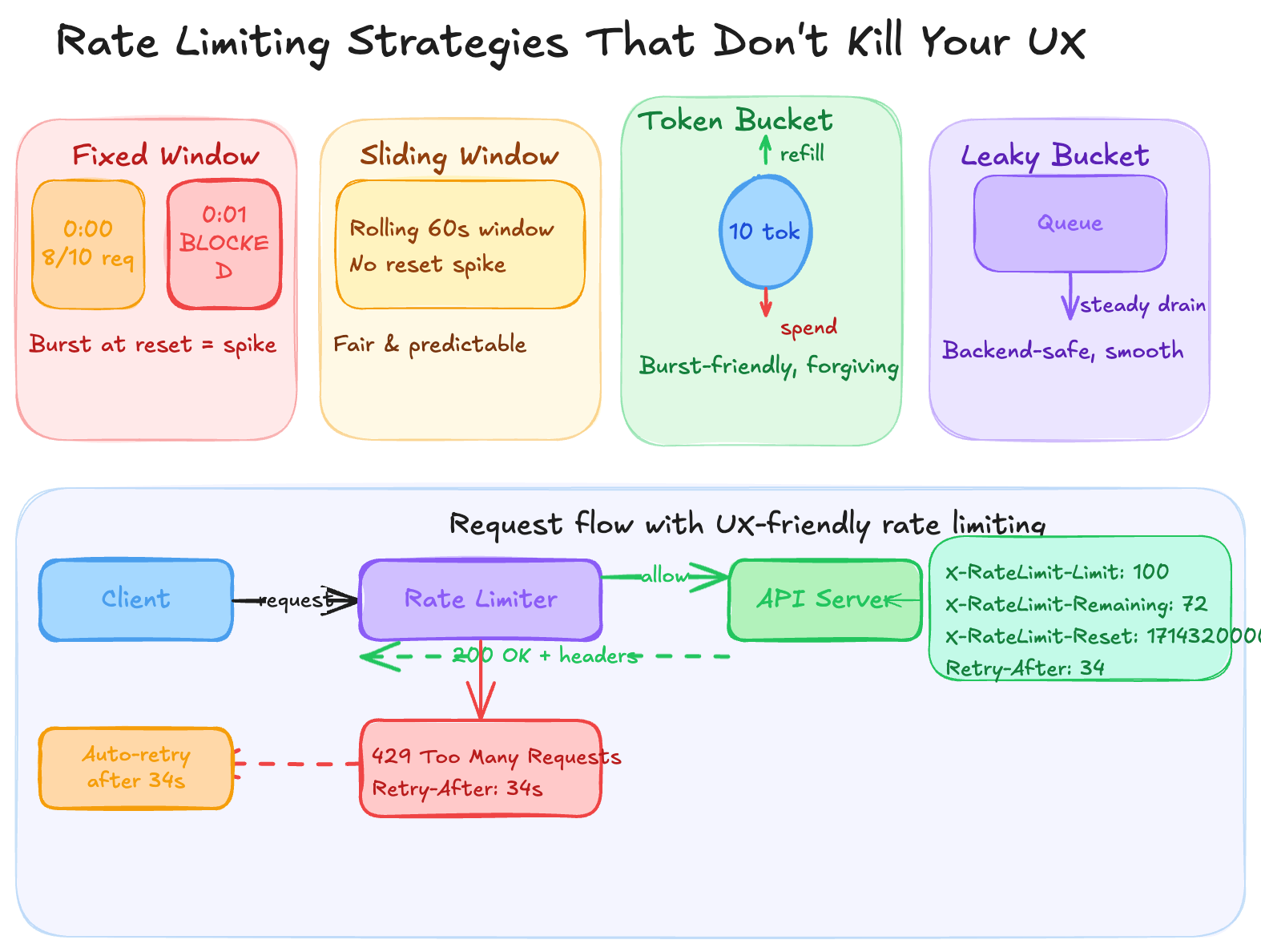
The four algorithms
Fixed window is the simplest: count requests per time bucket. The problem is the reset spike. Hit the limit at 0:00:45 and you wait until 0:01:00, then everyone rushes in at once. You've protected against steady load but created a predictable thundering herd.
Sliding window uses a rolling calculation instead of a hard clock reset. 100 requests per 60 seconds means any 60-second window. More memory to maintain, but much fairer.
Token bucket is the most user-friendly. Every user has a bucket that refills at a fixed rate; each request spends one token. Users who've been inactive accumulate tokens and can burst. Someone returning to your app after an hour offline doesn't immediately hit a wall. This maps well to how people actually use software.
Leaky bucket is the inverse — requests drain from a queue at a fixed rate no matter when they arrive. Excellent for smoothing output to downstream services. Frustrating for users during legitimate bursts.
For most SaaS apps, the right combination is token bucket per user plus sliding window per endpoint.
What actually kills the UX
Algorithm choice is secondary. The real damage comes from three things.
A 429 with no body is useless. The user can't tell if it's a momentary blip or a plan limitation. Return something they can actually read:
JSON7 lines
{
  "error": "rate_limited",
  "message": "You've used 100/100 requests this minute.",
  "retry_after_seconds": 34,
  "limit_type": "per_minute",
  "docs_url": "https://yourapp.com/docs/limits"
}
Include rate limit headers on every response, not just errors:
Code4 lines
X-RateLimit-Limit: 100
X-RateLimit-Remaining: 72
X-RateLimit-Reset: 1714320000
Retry-After: 34
Retry-After is the one that changes behavior. Without it, frustrated clients hammer your server every 100ms. With it, they can back off automatically.
The third issue is flat limits. A solo developer on a free plan and a 20-person team on enterprise should not share the same ceiling. Flat limits punish your heaviest users and are invisible to your lightest.
The Nepal problem
Most teams miss this one. In Nepal and across much of South Asia, users frequently work on unstable connections. An app might queue 30 offline actions and flush them all when connectivity returns.
A fixed window limiter sees this as an attack — 30 requests in 2 seconds — and blocks the user. Token bucket handles it naturally: the user built up tokens during the offline period and earned the burst. Token bucket isn't a preference for low-connectivity markets, it's the correct technical choice.
On the frontend
When you receive a 429, wait (2^attempt * 1000 + random(0, 1000)) ms before retrying. The jitter matters — without it, multiple clients retry in sync and you just created a new spike.
If your API returns X-RateLimit-Remaining, surface it somewhere before users hit zero. A quiet "72 of 100 requests used" in account settings beats a surprise error mid-task.
For write operations, queue actions locally and drain them at a rate that stays under your limit. The user sees immediate feedback; the API calls happen in the background.
Before you ship
For every blocked request, your rate limiter should be able to answer: what happened, which limit triggered, and when can the user try again. If it can't answer all three, there's communication work left.
The next post in this series covers building an auto-retry wrapper in TypeScript that reads Retry-After and handles backoff automatically.